
How can we help?
-
Asset
-
-
- Articles coming soon
-
- Articles coming soon
-
Facilities
-
Failures
-
- Articles coming soon
-
-
Group
-
Help
-
- Articles coming soon
-
- Articles coming soon
-
- Articles coming soon
-
- Articles coming soon
- Articles coming soon
-
-
Main Client Window
-
- Articles coming soon
-
- Articles coming soon
-
- Articles coming soon
-
- Articles coming soon
-
-
Scoreboard
-
- Articles coming soon
-
- Articles coming soon
-
- Articles coming soon
-
- Articles coming soon
-
-
Tools
-
-
- Articles coming soon
-
-
Window
-
- Articles coming soon
-
- Articles coming soon
-
- Articles coming soon
- Articles coming soon
-
Settings Screen
Posted
Updated
ByTheta Team
Print Objective:
To explain XSPOC Measurements/Units Configuration Screen.
Rights Needed:
☐Admin ☐ Admin Lite ☐Well Admin ☐Well Control
☐Well Config ☐Well Config Lite ☒Read Only
Versions:
XSPOC: 3.1, 3.2
Purpose:
Familiarize users with the Tools>Settings Screen
Instruction:

- Open the XPOC Client
- From the navigation panel locate and select the Tools Tab
- Click Tools Tab > Settings Icon
- The Settings screen launches and is used to configure the following:
- Measurements/Units
- Fluid rate
- Pressure
- Weight
- Temperature
- Length
- Power
- Gas rate
- Short Length
- Oil Gravity
- Towards the bottom right there are two buttons.
- Save
- Cancel
- On the bottom right there are two window control icons.
- The lock icon allows the user to lock the screen,
- The arrow icon allows the use to float the window and move it to other screens or areas of the same computer screen.
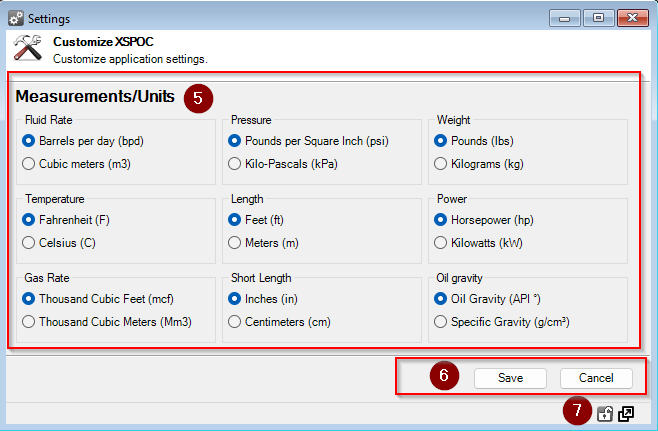
Table of Contents