
How can we help?
-
Asset
-
-
- Articles coming soon
-
- Articles coming soon
-
Facilities
-
Failures
-
- Articles coming soon
-
-
Group
-
Help
-
- Articles coming soon
-
- Articles coming soon
-
- Articles coming soon
-
- Articles coming soon
- Articles coming soon
-
-
Main Client Window
-
- Articles coming soon
-
- Articles coming soon
-
- Articles coming soon
-
- Articles coming soon
-
-
Scoreboard
-
- Articles coming soon
-
- Articles coming soon
-
- Articles coming soon
-
- Articles coming soon
-
-
Tools
-
-
- Articles coming soon
-
-
Window
-
- Articles coming soon
-
- Articles coming soon
-
- Articles coming soon
- Articles coming soon
-
Asset Control Scan and Action Functions
Posted
Updated
ByTheta Team
Print Objective:
Explain what a user is seeing on the Asset>Control Scan and Action Buttons.
Rights Needed:
☐Admin ☐ Admin Lite ☐Well Admin ☐Well Control
☐Well Config ☐Well Config Lite ☒Read Only
Versions:
XSPOC: 3.1, 3.2
Purpose:
These buttons allow the user with the correct specified rights to scan and to send specified commands to the controller.
Instruction:

- Open XPOC Client
- From the navigation panel locate and select the Asset Tab
- Click Asset>Scan
- This will scan the current well selected.
- Click Asset>Action and a drop-down menu appears allowing the user to send commands to the selected well, according to specified rights in XSPOC.
- Scan
- Scan Continuously
- Start Well
- Shutdown Well
- Idle Well
- Clear Alarms
- Reset Clocks
- Mode
- Constand Run
- % Timer
- POC
- Enable
- Disable
- SAM Reference Revolutions
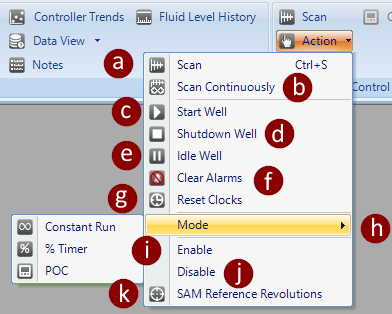
Table of Contents