
How can we help?
-
Asset
-
-
- Articles coming soon
-
- Articles coming soon
-
Facilities
-
Failures
-
- Articles coming soon
-
-
Group
-
Help
-
- Articles coming soon
-
- Articles coming soon
-
- Articles coming soon
-
- Articles coming soon
- Articles coming soon
-
-
Main Client Window
-
- Articles coming soon
-
- Articles coming soon
-
- Articles coming soon
-
- Articles coming soon
-
-
Scoreboard
-
- Articles coming soon
-
- Articles coming soon
-
- Articles coming soon
-
- Articles coming soon
-
-
Tools
-
-
- Articles coming soon
-
-
Window
-
- Articles coming soon
-
- Articles coming soon
-
- Articles coming soon
- Articles coming soon
-
Language Configuration
Posted
Updated
ByTheta Team
Print Objective:
To explain what the user sees using the drop-down Language pick list.
Rights Needed:
☐Admin ☐ Admin Lite ☐Well Admin ☐Well Control
☐Well Config ☐Well Config Lite ☒Read Only
Versions:
XSPOC: 3.1, 3.2
Purpose:
To familiarize XSPOC users with the drop-down Language pick list.
Instruction:

- Open the XPOC Client
- From the navigation panel locate and select the Tools Tab
- Click Tools Tab > Language Icon
- A drop-down pick list displays with six options
- German
- English
- Spanish
- French
- Russian
- Chinese
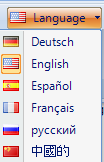
- The user can change the language of the client to display the main client and child forms in another language. Supported languages include English, French, Spanish, German, Russian and Chinese. Data used to support these languages is found in the LocalePhrases table in the database. Note that administrative changes are necessary to translate the XDIAG results for Rod Pumps into other languages and not all phrases or languages will be supported.
Table of Contents