
How can we help?
-
Asset
-
-
- Articles coming soon
-
- Articles coming soon
-
Facilities
-
Failures
-
- Articles coming soon
-
-
Group
-
Help
-
- Articles coming soon
-
- Articles coming soon
-
- Articles coming soon
-
- Articles coming soon
- Articles coming soon
-
-
Main Client Window
-
- Articles coming soon
-
- Articles coming soon
-
- Articles coming soon
-
- Articles coming soon
-
-
Scoreboard
-
- Articles coming soon
-
- Articles coming soon
-
- Articles coming soon
-
- Articles coming soon
-
-
Tools
-
-
- Articles coming soon
-
-
Window
-
- Articles coming soon
-
- Articles coming soon
-
- Articles coming soon
- Articles coming soon
-
Plugins Screen
Posted
Updated
ByTheta Team
Print Objective:
Explain what a user is seeing on the Plugins Screen
Rights Needed:
☐Admin ☐ Admin Lite ☐Well Admin ☐Well Control
☐Well Config ☐Well Config Lite ☒Read Only
Versions:
XSPOC: 3.1, 3.2
Purpose:
The Plugins section of the Asset Tab will display the available installed plugins currently in XSPOC. Plugins can be added to XSPOC by following the Plugin Development Manual instructions located in the Asset>Help menu. The XSPOC Plugin System allows users to write .NET applications and have them added to the XSPOC Client as a part of the total user experience using the Plugin API.
Instruction:

- Open XPOC Client
- From the navigation panel locate and select the Asset Tab
- Click Asset>Plugins
- In the example below, XSPOC launches a plugin created for PCSF controllers.
- The plugin allows the user to view and, in some cases, configure and control the asset selected.
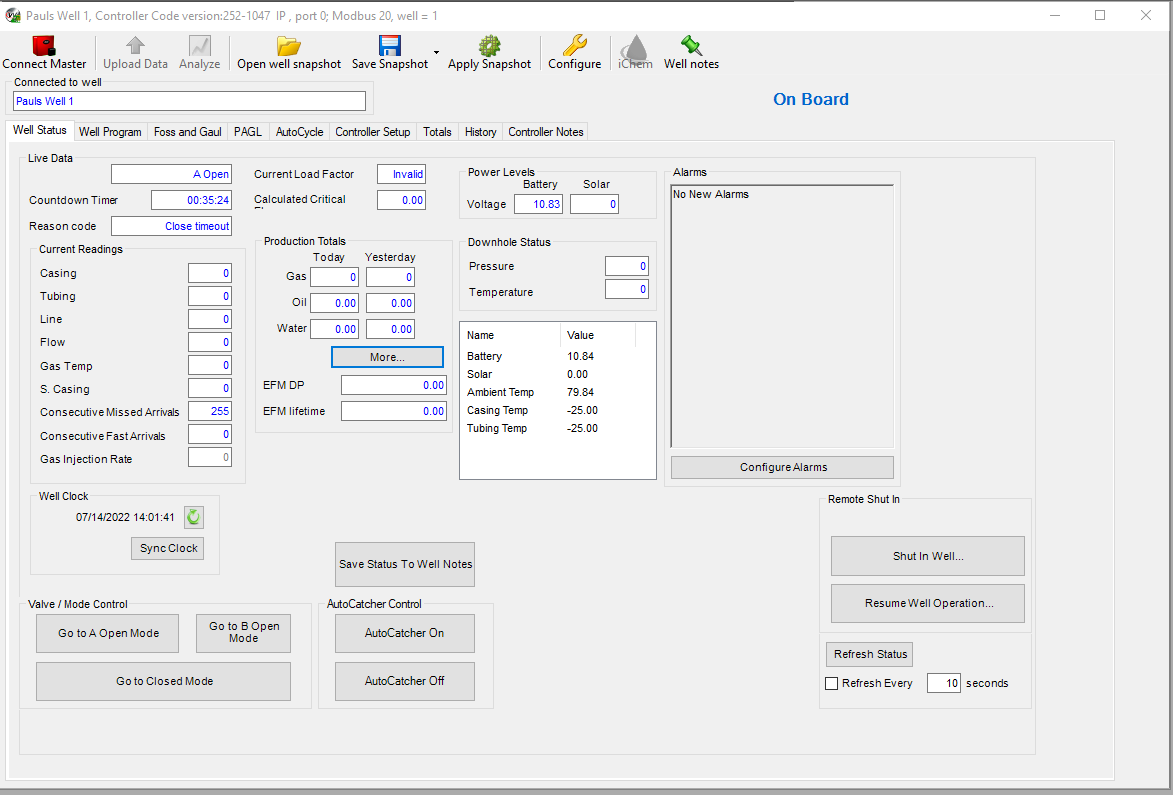
Table of Contents