
How can we help?
-
Asset
-
-
- Articles coming soon
-
- Articles coming soon
-
Facilities
-
Failures
-
- Articles coming soon
-
-
Group
-
Help
-
- Articles coming soon
-
- Articles coming soon
-
- Articles coming soon
-
- Articles coming soon
- Articles coming soon
-
-
Main Client Window
-
- Articles coming soon
-
- Articles coming soon
-
- Articles coming soon
-
- Articles coming soon
-
-
Scoreboard
-
- Articles coming soon
-
- Articles coming soon
-
- Articles coming soon
-
- Articles coming soon
-
-
Tools
-
-
- Articles coming soon
-
-
Window
-
- Articles coming soon
-
- Articles coming soon
-
- Articles coming soon
- Articles coming soon
-
Facilities – Plugin Screen
Posted
Updated
ByTheta Team
Print Objective:
Explain what a user is seeing on the Facilities Pugin Screen.
Rights Needed:
☐Admin ☐ Admin Lite ☐Well Admin ☐Well Control
☐Well Config ☐Well Config Lite ☒Read Only
Versions:
XSPOC: 3.1, 3.2
Purpose:
Designed to use an added Plugin to XSPOC to display specified well data.
Instruction:

- Open XPOC Client
- From the navigation panel locate and select the Facilities Icon
- Click Facilities>Plugins
- The Plugins section will display al plugins added by the user.
- One typical Plugin is the PCSF Plugin seen below.
- This Plugin can pull up a screen in XSPOC that is like the PCSF Well Vision software screen, a program that can also be used outside of XSPOC. It displays the following:
- Tool bar at the top of the screen
- Well information on various tabs in the center of the screen.
- Configuration and controls towards the bottom of the screen.
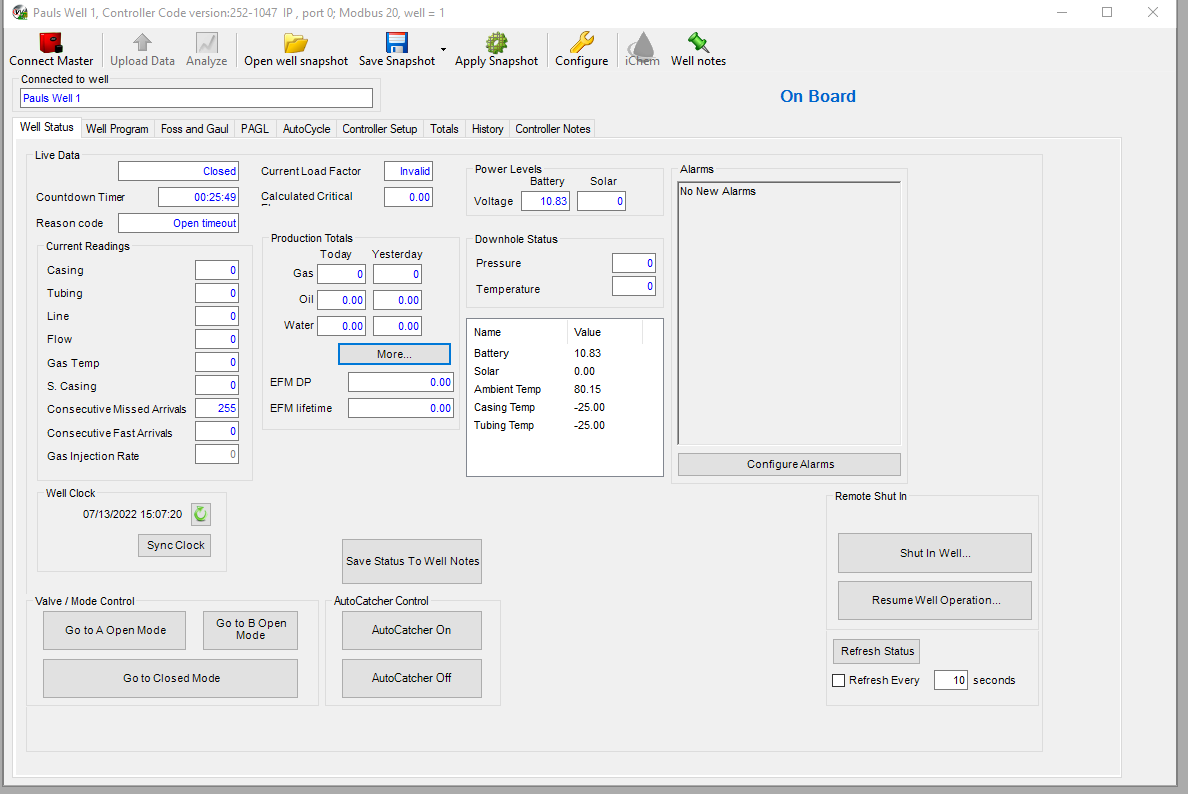
Table of Contents