
How can we help?
-
Asset
-
-
- Articles coming soon
-
- Articles coming soon
-
Facilities
-
Failures
-
- Articles coming soon
-
-
Group
-
Help
-
- Articles coming soon
-
- Articles coming soon
-
- Articles coming soon
-
- Articles coming soon
- Articles coming soon
-
-
Main Client Window
-
- Articles coming soon
-
- Articles coming soon
-
- Articles coming soon
-
- Articles coming soon
-
-
Scoreboard
-
- Articles coming soon
-
- Articles coming soon
-
- Articles coming soon
-
- Articles coming soon
-
-
Tools
-
-
- Articles coming soon
-
-
Window
-
- Articles coming soon
-
- Articles coming soon
-
- Articles coming soon
- Articles coming soon
-
Scoreboard Screen
Posted
Updated
ByTheta Team
Print Objective:
Explain what a user is seeing on the Scoreboard Screen.
Rights Needed:
☐Admin ☐ Admin Lite ☐Well Admin ☐Well Control
☐Well Config ☐Well Config Lite ☒Read Only
Versions:
XSPOC: 3.1, 3.2
Purpose:
Designed to give the user an overview of specified production and alarm statuses.
Instruction:
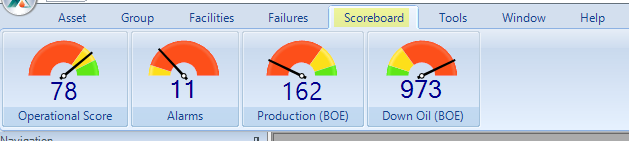
- Open XPOC Client
- From the navigation panel locate and select the Scoreboard Icon
- Click Scoreboard Operational Score
- A report opens
- Click Scoreboard Alarms
- The Alarm History Screen displays
- Click Scoreboard Production (BOE)
- The Well Test History Screen displays
- Click Scoreboard Down Oil (BOE)
- The Well Test History Screen displays
Table of Contents