-
Asset
-
-
- Articles coming soon
-
- Articles coming soon
-
Facilities
-
Failures
-
- Articles coming soon
-
-
Group
-
Help
-
- Articles coming soon
-
- Articles coming soon
-
- Articles coming soon
-
- Articles coming soon
- Articles coming soon
-
-
Main Client Window
-
- Articles coming soon
-
- Articles coming soon
-
- Articles coming soon
-
- Articles coming soon
-
-
Scoreboard
-
- Articles coming soon
-
- Articles coming soon
-
- Articles coming soon
-
- Articles coming soon
-
-
Tools
-
-
- Articles coming soon
-
-
Window
-
- Articles coming soon
-
- Articles coming soon
-
- Articles coming soon
- Articles coming soon
-
Flow-Cal Export Screen
Objective:
Explain what a user is seeing on the Flow-Cal Export Screen.
Rights Needed:
☐Admin ☒ Admin Lite ☐Well Admin ☐Well Control
☐Well Config ☐Well Config Lite ☐Read Only
Versions:
XSPOC: 3.1, 3.2
Purpose:
Customers communicating with ABB TotalFlow devices through XSPOC might want to export production data to an accounting/allocation program like ProCounts. XSPOC supports collection of this data in addition to a full audit trail for the information. If data is tampered with in any way in XSPOC, the software will not export the corrupted record. With this feature, the user can trust that the data exported from XSPOC is as secure and trustworthy as the information on the device itself. The Flow-Cal Export button allows the user to specify the locations to where Flow-Cal files are exported.
Instruction:

- Open XPOC Client
- From the navigation panel locate and select the Tools Tab
- Click Tools Tab > Flow-Cal Export Icon
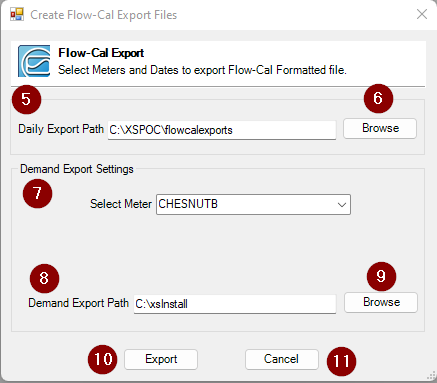
- A Create Flow-Cal Export Files window opens and displays the following:
- Daily Export Path row – designate where to save the report daily
- Browse button
- Demand Export Settings
- Select Meter – selects the asset to export data from a drop-down pick list
- Demand Export Path – designate where to save the report for this one-time export
- Browse Button
- Export – executes the export
- Cancel – cancels the transaction