How Can We Help?
Search for answers or browse our knowledge base.
-
Ally
-
- Articles coming soon
-
- Articles coming soon
-
- Articles coming soon
-
- Articles coming soon
- Articles coming soon
-
-
Internal Only
-
- Articles coming soon
-
- Manually remove from uninstall list
- Find orphaned history via sql
- PCSF Wellvision
- Change from Windows Auth to XSPOC Auth
- Speed up a Slow Database sp_updatestats
- Export import single well
- XSPOC module licenses
- Import Export Single Wells - Employees Only
- Copy group to new parent
- Motor Load
- Clone Parent Group with a new name
- Load Wells Worksheets
- Compare Database Script
- XSPOC Database Columns
- Theta VPN DNS Settings
- Facility Tags
- Show all articles ( 1 ) Collapse Articles
-
-
Standalone Products
-
XSPOC Software
-
- Automatic Chemical Control
- CollectCards Event Explained
- Lufkin SAM SPM Calculation
- Offset and Scale Factor
- ESP Valiant Motor Current is Calculated
- ESP Documentation
- Purdue Diagram - XSPOC
- System Parameter Info - XSPOC
- Connection Strings
- DataTypes UnitTypes
- XSPOC Gas Lift Analysis Input Guide
- XSPOC ESP Analysis Input Guide
- Alarm Actions
- Smarten Live Default Login
- Max # of lines in deviation profile
- Param Standard Types in Facility Tags
- Setpoint Optimization Info
- Group Status Calculated Column
- XSPOC Database Tables Related to Totalflow Communication
- New ParamStandard Type PST
- ESP Analysis Requirements
- Uplift Opportunities Required Data
- Group status conditional format
- Manually Collect and Process DYNO Cards
- Lufkin SAM Run Statuses
- Log Comm Messages
- Precedence Logic for ESP - how data is stored
- XSPOC Table Info
- POC Types In XSPOC
- Terminal Servers (Digi One-Black box)
- SQL Security Requirements for SpocWrite account
- SPC - Statistical Process Control
- Software Introduction
- System Requirements - XSPOC
- How Does XDIAG determine Out of Balance
- Group Status - Percentage RTY Yesterday's Run Time definition
- Well Status Screen
- XSPOC Lookup Tables
- Communicating with EFM Fisher ROCs
- FAQ How Do We Account For Wells In Different Time Zones
- Table IDs
- Importing .dyn files to Theta Software
- Components of XSPOC
- ABB TotalFlow Device Support in XSPOC 2
- ABB TotalFlow Device Support in XSPOC
- POCTypes
- Host Alarms
- Applications
- XSPOC Database Tables Related to Fisher ROC Communication
- Fisher Roc Register Addressing
- Fisher ROC Communication Initial Setup
- Show all articles ( 36 ) Collapse Articles
-
- Recover A Deleted Well
- XBAL Template Missing
- Using Register Block Limits
- Increase Scheduled Events Intervals
- Window Screen
- Tiny Gateway Setup Communications
- Parameter Trending
- Lufkin 2.0 - Cyclic Steam Injection Pressure Monitoring
- Add Parameter Trending By POCType
- Offset and Scale Factor
- Shutdown Group from Facility Tag
- Data Views
- Well Type (Expected Operation) VFD Variable Speed
- XSPOC Hosting New User Setup
- Adding Chemical Pump Control in XSPOC
- Well Group to Show Wells That Haven't Had a Card Pulled in 24 Hours
- SQL Profiler for troubleshooting
- Add new date formats in group status
- Well Addresses and communication options
- DoFastScan in tblSchedule
- Allen Bradley Device Communication
- Configuring High Resolution Historical Data Storage
- Calculated Tags
- PCSF Device Communication
- PCSF Master and PCSF Plugin
- Measurements in Data History
- Using TLS 1.2 with XSPOC
- Well Test Email Importer Setup
- Connection Strings
- XSPOC Gas Lift Analysis Input Guide
- XSPOC ESP Analysis Input Guide
- OpenWells Integration
- Disable Codes
- Generate an XSPOC License Certificate File
- Default windows views
- Disable ELAM for individual wells
- Reset / update database stats
- External Data Query Default
- Powershell script to count processes
- Encrypted Password
- Loopback Echo test at the well
- Add a Custom Controller POCType
- Adding a Custom Pumping Unit to XSPOC
- Moving a Data Base from One Drive to Another Drive
- Morning Reports
- Main Client Window
- Logging Comm Traffic for a Port or Node
- Limit User Navigation to a Group
- License Manager
- HOW TO Configure Generic Well Test Import
- HOW TO Configure WellView Import
- How to delete change trend data points from History Graph
- How to Generate XSPOC License File
- How to setup Admin message to all users
- PMC Salt Register explanation
- POC Modes
- POC Trends Window
- Positioning the Pump-Off Setpoint
- Run XBAL from XSPOC
- Recreate Data History Indexes
- Register Panel Window
- Report WIndow
- Restoring an XSPOC system
- Run RODSTAR-V or RODSTAR-D from XSPOC
- Remote Shutdown of Lufkin VFD
- Installing XSPOC Mobile
- Set up Hi Lo Alarm Callout
- Setting up Register Logging for a Lufkin SAM in XSPOC
- Send Write Sequences to Wells
- Split Installation
- SQL View for XDiag required data
- System Parameter DisableCustDBUpdate
- Set up a Discrete Alarm Callout
- Setpoints Window
- Setting the Number of Weeks to Store Dynamometer Cards
- Standalone Product Installation Guide
- Shutdown Start Clear Well With tblCommandActions
- Starting Rodstar
- Modbus comm setup
- tblPortMaster Settings
- To Add an Automatic Scheduled Call-Out (verify system is working)
- Using Read-Only Fields in Well Config
- User Permissions Security Settings
- Updating the license on the Sentinel
- Upgrade SQL Express to Standard or Enterprise
- User Security - Active Directory Group Security Configuration
- Invalid Connection String Attribute
- How to update the HASP config file
- ABB TotalFlow Device Support
- Moving an XSPOC system
- HOW TO Install the Data Integration Module
- Scheduled Events and Descriptions
- Other Well Measurements Window
- Network Seamless Installation for xsClient
- Comm Status Alarming by Comm Channel
- HOW TO Configure Generic Data Export
- HOW TO Configure Data Integration (Start Here)
- How To Change SpocWrite Password
- How to Adjust XSPOC Field Labels
- How to Add OPC Servers to XSPOC
- How to activate your Theta software
- HOW TO Use the OLE DB Client application
- HOW TO Create a Branch
- Obtaining Run Status for Baker Weatherford or WellPilot
- Host Alarms
- History Graph Window
- Group Alarm History
- Group Well Test History
- Group Status Window
- Group Status Views Setup
- Group Status Columns - Merge Similar Columns
- Group Parameter Trending
- Group Builder
- Graph Settings Window
- Using a Digi Terminal Server
- Well Notes Window
- View Multiple Cards
- XSPOC Database Window
- Add a Parameter to Group Status View
- Add an Analog Input
- Application and Database Server Install of XSPOC
- Card Viewer
- Configure Standalone Product Launch from XSPOC
- FAQ How Do We Account For Wells In Different Time Zones
- FAQ Share a comm channel
- FAQ Monitoring Power
- FAQ Why don’t I see my xsScannerL and xsCommServer icons in the task manager
- Field Maps
- Granting Higher Level Access for Users
- HOW TO Configure Generic Data Import
- Facility Status Window
- Facility Reports
- External Data Query Setup
- External Data Query
- Export Data History Window
- Energy Mode
- Email to Text
- Email Notification Setup
- Email Configuration in XSPOC
- XSPOC Database Merge (Well Sale Only)
- Cumulative Production Limits
- Control of XSPOC Wells from Another Program
- Configuring Facility Tags
- Configuring Exception Groups
- Configuring Analog and Digital Input Registers
- Comm Status Alarming by Comm Channel
- Collection Modes
- Changing Phrases in the Client
- Card Viewer
- XSpoc Backups
- Back up Database Using Scheduler
- Associate User Views
- Assigning Custom Icons to Custom POCs
- Archive Options in XSPOC (ArchiveDataHistory SP)
- Adding an All Call to the system
- Alarms
- Adding Custom Event Groups for Well Notes
- Adding A New Well
- Add Parameters - Setpoints Control Panel
- Add New Well
- Add an Analog Input
- Add a Port into Configuration Table
- XSPOC Database Merge (Well Sale Only)
- Show all articles ( 148 ) Collapse Articles
-
- Articles coming soon
-
- Sierra Wireless config
- XSPOC General Troubleshooting Tips
- Large Database Transaction Logs
- Error deleting group <missing>
- Unable to convert raw value error
- User already exists in the current Database
- Member HostName of connection is invalid
- Unlocking a Deadlocked SQL Database
- Rodstar file cannot be located for this well.
- History Graph missing data
- Missing Data points on Mobile History Graph
- Missing Font causing Group Status error crash
- PumpingUnitID CAB## problem
- RODSTAR XROD XR NullReferenceException Object Instance Error Entity Framework
- Troubleshooting Card Viewer Problems
- Troubleshooting License Issues
- Troubleshooting Tubing Movement
- HASP driver install fails
- Well Test Date Range Error
- Well Pilot Draw Cards in Run Constant Mode
- Wells not scanning - Troubleshooting
- XDIAG doesn't start, timeout
- XSManager crashes upon launch
- Cannot Add Additional Comm Ports And The Correct Number Of XSCommServer.exe Processes Will Not Launch
- Can't Get Analysis
- Locked columns in the Database
- FAQ Are there XSPOC client errors log
- FAQ Connection to the server could not be established
- FAQ Downhole card missing on Card Viewer
- Missing Manufacturer on the pumping unit list
- Function Validate Registration fails
- tmpout.dat error saving a key in License Key Manager
- Err# -2147217900
- DBMods error Quoted Identifier is set to OFF
- Show all articles ( 19 ) Collapse Articles
- Articles coming soon
-
Window Screen
Created On
byTheta Team
You are here:
< Back
Window Screen
Objective:
Explain what a user is seeing on the Window Screen.
Rights Needed:
☐Admin ☐ Admin Lite ☐Well Admin ☐Well Control
☐Well Config ☐Well Config Lite ☒Read Only
Versions:
XSPOC: 3.1, 3.2
Purpose:
Designed to give the user control over specified window display features in XSPOC.
Instruction:
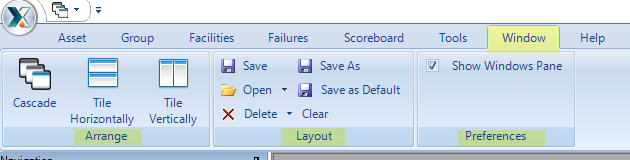
- Open XPOC Client
- From the navigation panel locate and select the Window Icon
- The Window Icon displays three sections.
- Arrange – allows the user to select how multiple windows will appear in the child window section of the client
- Cascade
- Tile Horizontally
- Tile Vertically
- Layout – allows the user to open, save, delete, and clear Window layouts
- Preferences – allows the user to set “Show Window Pane”
- Arrange – allows the user to select how multiple windows will appear in the child window section of the client